Styles

Monday, March 10, 2014

Lazy Loading in C# - Performance vs Memory

After a long deliberating discussion with a couple of work colleagues about the pros and cons of lazy loading compared to eager loading, a few interesting conclusions arose.

Many programmers often tend to fall into the trap of instantiating all their objects during the initialization of another parent object (either in the constructor or otherwise).


    public class AccountController : BaseContoller
    {
        UserBusinessFunctions _userFunctions = null;
        RoleBusinessFunctions _roleFunctions = null;
        PermissionBusinessFunctions _permissionsFunctions = null;
        MailoutBusinessFunctions _mailoutFunctions = null;
        public AccountController()
        {
            _userFunctions = new UserBusinessFunctions();
            _roleFunctions = new RoleBusinessFunctions();
            _permissionsFunctions = new PermissionBusinessFunctions();
            _mailoutFunctions = new MailoutBusinessFunctions();
        }
        public ActionResult Index()
        {
            return View();
        }
    }

For windows applications this might be beneficial in that the initial load time may vary, however the rest of the user's experience is very smooth because everything has been loaded already.

However, for much larger projects this can seriously affect the processing of an application in terms of memory and initial loading. Imagine you had to create a new instance of AccountController just to call one function (e.g. Index()) and all that the function did was return an AcionResult object just as MVC does on the initial load of the default page. Moreover, web pages specifically have a decoupling of server side code to the client-side rendered HTML page; so memory is eventually released after a Response is complete. However, that means that the AccountController class will be instantiated every time a request is made to the Index() function. Imagine 15,000 users make a request from their browser to the same function at the same time.
The Garbage Collector may not have enough time to clean up the unused functions.

Some developers could write that off quite easily when they are under the impression that production servers are enormous beasts with infinite amount of RAM. That may be true to an extent, but when you use only one production server to host multiple sites, each of which can have many thousands of users, memory can be easily chewed up. You may have a cloud solution for this, and it could be as simple as "upping" the memory in cloud management, but that could get very expensive very fast.

Lazy loading is the best solution to solve this problem.

    public class AccountController : BaseContoller
    {
        UserBusinessFunctions _userFunctions = null;
        RoleBusinessFunctions _roleFunctions = null;
        PermissionBusinessFunctions _permissionsFunctions = null;
        MailoutBusinessFunctions _mailoutFunctions = null;
        public AccountController()
        {
        }
        public ActionResult Index()
        {
            return View();
        }
        public UserBusinessFunctions UserFunctions
        {
            get
            {
                if (_userFunctions == null)
                {
                    _userFunctions = new UserBusinessFunctions();
                }
                return _userFunctions;
            }
        }
        public RoleBusinessFunctions RoleFunctions
        {
            get
            {
                if (_roleFunctions == null)
                {
                    _roleFunctions = new RoleBusinessFunctions();
                }
                return _roleFunctions;
            }
        }
        public PermissionBusinessFunctions PermissionsFunctions
        {
            get
            {
                if (_permissionsFunctions == null)
                {
                    _permissionsFunctions = new PermissionBusinessFunctions();
                }
                return _permissionsFunctions;
            }
        }
        public MailoutBusinessFunctions MailoutFunctions
        {
            get
            {
                if (_mailoutFunctions == null)
                {
                    _mailoutFunctions = new MailoutBusinessFunctions();
                }
                return _mailoutFunctions;
            }
        }
    }


As shown above, there is no longer any instantiation made in the constructor. This means that for every call to the Index() function, there will no longer be any unnecessary allocations in memory to unused objects just to return an ActionResult object.

What that also means is, if you actually want to use one of the business function objects in the example above, then rather than using the _userFunctions variable, you would have to access the property instead:

User user = this.UserFunctions.GetUser(id);

There is also another page that elaborates on the new C# 4.0 feature of "Lazy Initialization" which is slightly different to the standard "Lazy Loading" pattern mentioned above.


I can see advantages in all three of the scenarios mentioned above:
  • Initializing all in the constructor - good for Silverlight apps where performance is vital over memory usage on the client side. What that means is that there will be more time loading the Silverlight progress bar at the beginning while the application loads the objects in its memory resources, but the rest of the experience is seamless from then on.
  • Lazy loading in the property - good for servers that have multiple web applications/web services/win services running where slight performance trade-offs for valuable memory is important.
  • C#4.0 "Lazy Initializing" - good for examples where you instantiate a bunch of objects before entering a large loop, but want the loop to start as soon as possible.


Tuesday, January 14, 2014

DateTime.Parse vs DateTime.ParseExact for culture issues


I'm sure most of us savvy .NET developers have come across the dreaded issues that surround the inconsistent standards when working with multilingual / multicultured applications. Namely the sites that provide the opportunity for a user to change their language and/or culture for their convenience.

Dealing with different languages is one thing, but that in itself isn't so bad because it mainly deals with a resource file of some sort that allows mapping of one word (or a sentence) to a different word of a different language. The site can then replace those words where it finds them.

Dealing with data, and specifically dates on the other hand, is a completely different story.

Seriously, why did the Americans have to come up with a date format that doesn't even conform to itself!? Generally speaking, numbering systems work by having the larger metric unit at the front, then the second metric unit succeeding it, and so on (e.g. $15,432,67). Naturally you would expect the date structure to be the same so that the military format (yyyy/MM/dd) would be found wherever we deal with dates.

Even though the Australian format doesn't conform to this, it at least has consistency by having the reverse, whereby the smallest metric is found at the beginning of the sequence (dd/MM/yyyy).

The U.S. format, however, is an influence of their own language. It comes purely from a cultural perspective where they are naturally inclined to say "February the 15th" rather than "the 15th of February". That has lead to the demise of their date format which logically makes no sense (MM/dd/yyyy).

Regardless of the format, we are still faced with the dilemma of having to interpret this in code so that our data isn't corrupted by the front-end client machine's culture, and the server's culture, when the server-side code deals with the data.

You may find that you have a JQuery date picker that can help you "set the culture" as shown below:


$(".datepicker").datepicker({ dateFormat: "dd/mm/yy" });


The problem would arise once the user clicks submit and hits a server with the "en-US" culture.
The moment you write the following code, you will face some issues:


var date = DateTime.Parse(Request.Form["date"]);

One of two problems will arise:
  • the date conforms to either en-AU or en-US because the "day" is not greater than 12, and therefore will not complain when translating it into a month part.
  • a FormatException will occur because the day is considered month and is invalid if greater than 12.
The way to work around this so as to Parse the date into the current culture of the server, but based on the culture you are expecting the string to be coming in from the client side.

var date = DateTime.ParseExact(Request.Form["date"], "dd/MM/yyyy", CultureInfo.CurrentCulture);

What this does is define the structure of the string that is passed into the first parameter, based on the format of the second parameter. Once it maps the string exactly as defined in the second parameter, it can then convert it successfully to a DateTime type based on the third parameter. The CurrentCulture can define the timezone as well as the format, and any other relevant metadata.


Monday, August 20, 2012

Orchard CMS - Top 10 "Good-To-Knows"

Currently at http://resonatesolutions.com.au I’ve had the opportunity to delve into the latest release of Orchard CMS (version 1.4), however working with customising certain components can be quite cumbersome, especially when the eBooks and documentation on Orchard is quite thin. Most of my success has come from reverse engineering some of the core modules that are provided in the open source version of the install. The following are some of the issues that have provided time consuming problem-solving exercises:

1. Directory Listing issue

Quite frequently I used to get this error when starting my orchard application:

Directory Listing -- /OrchardLocal/


        Monday, June 25, 2012 12:51 PM        <dir> App_Data         Monday, July 09, 2012 11:26 AM        <dir> bin       Wednesday, May 30, 2012 03:35 PM        <dir> Config       Wednesday, May 30, 2012 03:37 PM        <dir> Core         Tuesday, May 22, 2012 12:58 PM          103 Global.asax         Tuesday, May 22, 2012 12:58 PM        2,124 Global.asax.cs       Thursday, June 21, 2012 10:23 PM        <dir> Media         Friday, July 06, 2012 06:55 PM        <dir> Modules         Sunday, July 08, 2012 01:50 PM        <dir> obj       Thursday, June 28, 2012 12:42 PM       13,574 Orchard.Web.csproj       Thursday, June 28, 2012 12:42 PM        1,170 Orchard.Web.csproj.user       Wednesday, May 30, 2012 03:35 PM        <dir> Properties         Tuesday, May 22, 2012 12:59 PM          442 Refresh.html         Monday, July 02, 2012 01:36 PM        <dir> Themes         Friday, June 22, 2012 04:26 PM        9,177 Web.config

After pulling my hair out trying to find out whether this was an IIS issue or whether it was a file permission issue with the ASPNET account, I found that the problem actually lay with an exception that had occurred before Orchard’s URL rewriting had kicked in, thus allowing the site to land in the default directory which incidentally didn’t have a default file associated with it.
Even if you were to navigate to a bookmarked URL it would give the notorious yellow screen of death with the 404 server error:

The resource cannot be found.

In order to solve this problem you will have to go to the log file to find the actual error found in /App_Data/Logs/orchard-error-yyyy.MM.dd.log
The information provided there is the exact stack trace of your code, to help you solve your problem and just like magic the site will start working again.

If only Orchard handled this a lot better…

2. Changing a property name of a ContentPartRecord in your Custom Module

Another issue relates to Orchard’s choice of ORM, NHibernate and its caching capabilities.
Say, for example, you had the following ContentPartRecord in your Models folder of your Custom Module:

    public class PulseLookupRecord : ContentPartRecord
    {
        public virtual string ConnectionString { get; set; }
    }

If we were to rename this to ConnectionString1, then rename the database column that relates to this, this should work fine if we rebuild our module and start the Orchard web application.
However the application starts we will notice that the field that this property is associated with will not be rendered, and Orchard’s notorious silent errors will have vital information that we have missed. When looking at the log file we notice the following error message:

NHibernate.PropertyNotFoundException: Could not find a getter for property 'ConnectionString1' in class 'Pulse.Lookup.Models.PulseLookupRecord'

We would assume that since we have updated all the required field properties that NHibernates mapping should just work as it should, however the problem exists because NHibernate’s mapping is actually cached in a file stored in \App_Data\Sites\Woolworths\mappings.bin.

Simply removing this file will force Orchard to rebuild its NHibernate mapping and everything will then work fine.

3. Accessing the connection string dynamically

The only place that you can find the connection string that was set initially when cooking a new site or tenant is in a text file found in the /App_Data/Sites/[Default]/Settings.txt file.
However it would be extremely inpractical to start using System.IO to manipulate and read the line that contains the connection string line from within that page to use it.
There is another place, however, where you can retrieve the connection string dynamically via your module’s code however the biggest problem is that the _session field that contains the ConnectionString property is actually a private field found in NHibernate’s HqlQuery type. This is how you can retrieve the Session from which you can subsequently retrieve the ConnectionString property:

private NHibernate.ISession GetPrivateSession(IHqlQuery query)
{
     return (NHibernate.ISession)((DefaultHqlQuery)Services.ContentManager.HqlQuery()).GetType()
         .GetField("_session", BindingFlags.NonPublic | BindingFlags.Instance).GetValue(query);
}


4. Creating a custom site-wide setting

There are literally two lines of code you will need to implement a site-wide setting after creating a very standard part.
Add an extra filter to your handler for your part that is associated with the “Site” Content Type:

    public class PulseLookupHandler : ContentHandler
    {
        public PulseLookupHandler(IRepository<PulseLookupRecord> repository)
        {
            Filters.Add(new ActivatingFilter<PulseLookupPart>("Site"));
            Filters.Add(StorageFilter.For(repository));
        }
    }

“Site” Content Type isn’t actually visible in the Content Type list in the orchard admin, rather is found in “Settings” > “General”.

And then to actually access the property that has been created you will need the following line which can be written anywhere in the site that uses the “Service” object:

public class PulseLookupFieldDriver : ContentFieldDriver<PulseLookupField>
{
public IOrchardServices Services { get; set; }
public PulseLookupFieldDriver(IOrchardServices services)
{
     Services = services;
}
protected override DriverResult Editor(ContentPart part, PulseLookupField field, dynamic shapeHelper)
{
     var siteSettings = Services.WorkContext.CurrentSite.As<PulseLookupPart>();
}
}


5. Access Denied when installing a Module

This again is a misleading error message that does not explain the issue. Apparently when a module is downloaded it can only be installed via the Default Orchard site, not one of its Tenant instances. It would be more appropriate if that option was removed completely from a Tenant instance or at least provide a more relevant error message that explicitly explains an Orchard-specific issue.

6. Including a custom module in your Orchard.Web causes runtime exceptions

The biggest issue with trying to debug a module is when you decide to include the module files within the Orchard Web project (which naturally resides in the Modules folder). This will allow you to debug up until a certain point where one of your custom types are being referenced, then the following error message will get thrown in your face:

The type 'Pulse.Lookup.ViewModels.PulseLookupFieldViewModel' exists in both '..\Pulse.Lookup.dll' and '..\Orchard.Web.DLL'

The main reason for this is that Orchard actually has a dynamic compiler that locates your .csproj file and compiles it on the fly, essentially creating a dll and storing it physically in the \Orchard.Web\App_Data\Dependencies\ folder to be used within the Orchard CMS. That that would in effect cause a problem if you have already compiled the module within the Orchard web project already. Even though during compile time there is no issues, the custom type you have created would be embedded within the Orchard.Web.dll. That means that when Orchard also compiles the module on the fly during runtime another dll would be created specifically for your module, thus creating the same object type with the same namespace in two separate dll and this is where the problem lies.

The best way to work around this is to actually include your project as a Web Application under the “Modules” Solution folder within the solution itself (and not include the files in the Orchard.Web) folder. Attaching this Web Application as a project reference (by selecting the .csproj file) effectively attaches the debugger to the compiled version of that project which is bound by the Web application added in your Orchard solution, thus allowing breakpoints to actually work in the code files of your module within the Orchard solution.

7. Web Server crashes after calling updater.TryUpdateModel In the Driver’s Editor function

When creating a custom field and having an underling ViewModel to display supporting information for that field, there is an issue upon posting via the Edit form which calls the overridden Editor function in the Driver. Once the updater.TryUpdateModel function attempts to update the custom field, it will successfully update it in memory then returns from the function which then fires an underlying Orchard events that attempt to update the ContentItemVersionRecord table in the Orchard database. This ends up hanging then crashing the web server that hosts the Web application.
After looking at the Event log to find out what the actual error was that crashed the web server the following .NET error was found:

Exception: System.InvalidOperationException
Message: Operation is not valid due to the current state of the object.

Basically what this is trying to say is that the field’s data could not be committed to the database because there was no update state on the record to allow for a database update. You will need to tell Orchard that there has been a change made on the field and that is by flushing the current state of the content via the content manager using the following line of code:

    public class PulseLookupFieldDriver : ContentFieldDriver<PulseLookupField>
    {
        public IOrchardServices Services { get; set; }
        public PulseLookupFieldDriver(IOrchardServices services)
        {
            Services = services;
        }
        protected override DriverResult Editor(ContentPart part, PulseLookupField field, IUpdateModel updater, dynamic shapeHelper)
        {
            if (updater.TryUpdateModel(field, GetPrefix(field, part), null, null))
            {
                Services.ContentManager.Flush();
            }
            return Editor(part, field, shapeHelper);
        }
    }

8. Opening a separate database connection within Orchard’s current session

When running two concurrent database connections and exceptions will be thrown via SQL Server and the error message will be as follows:

System.Data.SqlClient.SqlException: MSDTC on server 'localhost' is unavailable

The solution to this is as simple as starting the following service on the server: “Distributed Transaction Coordinator”. This can be achieved by going to Administrative Tools > Component Services > Expanding to "My Computer" > Expanding "Distributed Transaction Coordinator" > Right-Click "Local DTC" >  On the Security Tab and checking the "Network DTC Access" and the "Allow Remote Clients" as well as the "Allow Remote Administration" checkboxes.

9. Custom fields visible in Projection Queries Filtering

Following the online tutorials on how to create a custom field, it was pretty simple adding it to a Content Type as shown below:

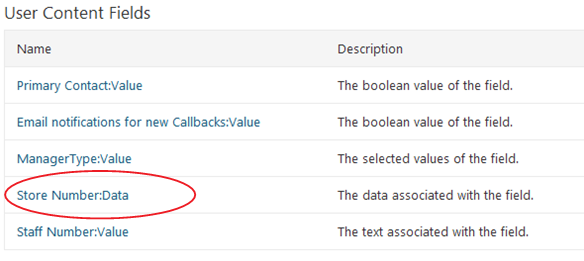
However when you want to use the inbuilt Query module (which is part of the Projection Module), it doesn’t get displayed by default when wanting to add filtering. In other words what we hope to achieve is to show the below when you want to add a filter:


Without any documentation on how to achieve this, and after a little reverse engineering I realised that I needed to override the “Describe” function in the ContentFieldDriver class that was created for the custom field.
It is as simple as writing the following in your field’s Driver:

    protected override void Describe(Orchard.ContentManagement.Handlers.DescribeMembersContext context)
    {
        context.Member(null, typeof(string), T("Data"), T("The data associated with the field."));
    }

You will notice the second parameter here passes in a string type. What this in effect does fire the relevant IFieldTypeEditor (in this case the StringFieldTypeEditor which is found in the Projection Module) to add it to the FilterContext which lists the fields to filter as shown above.

10. Form Posts throwing Anti Forgery Exception

This issue is actually related more so with MVC3 rather than orchard itself, however it is important to note that since Orchard uses MVC3, solving this problem is relevant for any custom module implementation that required a postback on the Display view of the module.

Within the display view of the module, if you were to simply put the following form tag :

    <form action="/OrchardLocal/pending" method="post">
        <input id="Search" name="Search" type="text" value="" />
        <input type="submit" value="Search" />
    </form>

This would result in the following exception when the submit button is pressed:

System.Web.Mvc.HttpAntiForgeryException
A required anti-forgery token was not supplied or was invalid

This is because MVC3 now has a way to guard against cross-site request forgery. The best way to overcome this is to have a hidden field that verifies that you are in fact the legitimate source of the request as shown below:

    <form action="/OrchardLocal/pending" method="post">
        <input id="Search" name="Search" type="text" value="" />
        <input type="submit" value="Search" />
        <input name="__RequestVerificationToken" type="hidden" value="y+2p1g6OrozuycUmsWXGxi7fsmByM6Kj3EGP87FoeNzZI=" />
    </form>

But how do we actually create this hidden field with the correct token? It’s as simple as replacing your form tag with the following razor server-side code:
    @using (Html.BeginFormAntiForgeryPost())
    {
        @Html.TextBox("Search")
        <input type="submit" value="Search" />
    }